Free Chrome Extension

Never Forget an
Email Attachment Again

Attachment Reminder scans your email for default keywords or any custom words you add (in any language!) — and alerts you right after you hit Send without a file.

Zero data collection — your emails never leave your browser
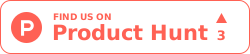
Attachment Reminder in action — email compose window with attachment warning popup
Attachment Saved!
📎
Smart Detection

Works seamlessly with your favorite email providers

Everything You Need to Email with Confidence

Smart, lightweight, and built to save you from the most common email mistake.

🔍

Smart Keyword Detection

Automatically scans your email body for common default keywords like "attached", "enclosed", ".pdf", or "invoice".

📎

Attachment Verification

Checks if files are actually attached — works with drag & drop, cloud links (Google Drive, Dropbox), and inline attachments.

Instant Warning Popup

Intercepts the Send button and shows a friendly modal so you can attach your file before it's too late.

🎯

Custom Keywords

Add your own trigger words in any language! The extension fully supports all languages and alphabets to match your unique workflow.

☁️

Cloud Sync PRO

Premium users get their keywords synced across every Chrome browser signed into their account.

⏸️

Snooze Mode

Temporarily disable the reminder when sending quick emails — the extension won't interrupt your flow.

Three Steps to Save Your Emails

Set it up once, and it quietly works in the background every time you compose an email.

1

Install the Extension

Add Attachment Reminder to Chrome with one click. No sign-up required for the free plan.

2

Write Your Email

Compose your email normally in Gmail, Outlook, or Yahoo Mail. The extension monitors in the background.

3

Get Alerted Instantly

If you mention an attachment but forget to attach it, a friendly popup stops you right after you hit Send.

💡 Important Tip
Gmail and Outlook have their own built-in attachment reminders that may conflict with this extension — causing double popups or unexpected behavior.

For the best experience, we recommend disabling the built-in reminders in your email settings.
How to disable it — step by step guide
⚠️

Wait a second!

I spotted the word "attached", but I don't see any files attached.

Oops, I'll Attach
Ignore Warning

See It in Action

The moment you click "Send" without an attachment, Attachment Reminder steps in with a polite, non-intrusive popup giving you the chance to fix the mistake.

  • Detects 10+ default keywords out of the box
  • Recognizes cloud links (Google Drive, Dropbox, OneDrive)
  • Works in multiple compose windows simultaneously
  • Dark mode support that follows your preference
  • Fully supports custom keywords in any language
  • Zero data collection — your emails stay private

Simple, Transparent Pricing

Start free, upgrade when you need more power.

Free
Perfect for casual email users
$0
Forever free
  • Up to 10 custom keywords
  • Gmail, Outlook & Yahoo support
  • Instant warning popup
  • Snooze mode
  • Import / Export keywords
  • Supports all languages
  • Cloud sync
  • Signature-free emails
Get Started Free

Frequently Asked Questions

Quick answers to common questions about Attachment Reminder.

Attachment Reminder works with Gmail, Microsoft Outlook (web version), and Yahoo Mail. It runs directly in your browser, so there's nothing to configure for each email provider.
No. Attachment Reminder only scans the email you're composing — the one currently being written. It never reads your inbox, sent emails, or any other data. All processing happens locally in your browser. Zero data is sent to any server.
Absolutely! Free users can add up to 10 custom keywords. Premium users get unlimited keywords. You can add words like "resume", "contract", "portfolio" or any term relevant to your work.
Yes! The extension fully supports all languages and alphabets. Whether you email in Spanish, French, German, Japanese, Arabic, or any other language, you can add your own custom keywords and the extension will detect them perfectly.
If you click "Ignore Warning," your email will be sent as-is, without an attachment. The extension respects your decision — it's just there to remind you, not to block you.
Free users get a small, subtle "Powered by Attachment Reminder" signature at the bottom of their emails. Premium users have this removed entirely — your emails stay 100% clean with no trace of the extension.
Yes! You can cancel anytime from your subscription dashboard. There are no contracts or hidden fees. When you cancel, you keep Premium access until the end of your billing period.
When you subscribe to Premium, you get full access to all features for 3 days completely free. You won't be charged anything during the trial period. If you decide it's not for you, simply cancel before the 3 days are up — no charge, no questions asked. If you love it (and we think you will!), your subscription starts automatically after the trial ends.

Stop Sending Emails Without Attachments

Join thousands of professionals who trust Attachment Reminder to catch their mistakes before they happen. Try Premium free for 3 days.

Add to Chrome — It's Free
Premium includes a 3-day free trial · No charge until the trial ends